Web Building
Gray text is a business decision
Light gray body text looks clean in a design review. On a phone outdoors, a lot of people can’t read it.

Light gray body text looks clean in a design review. On a phone outdoors, a lot of people can’t read it.
In short: Low-contrast text is the most common accessibility problem on the web. WebAIM found it on 83.9% of the top million home pages this year. It usually gets approved on a large monitor by people who already know what the copy says, then read on a phone outdoors by people who don’t. Checking your own site takes a couple of minutes, and the fix is often a few color values.
It usually happens in a design review. The mockup is on a big screen, the headline is near-black, and the body copy is a soft gray, around #999 on white, because black looked heavy next to the photos. It looks clean, and it gets approved.
The people in that review already know what the copy says, so nobody has to read it closely. The gray never really gets tested.
A few weeks after launch, the client checks the site on their phone at lunch, brightness down, and has trouble reading their own About page. That’s often when someone first notices.
Nielsen Norman Group’s Katie Sherwin covered the usual reasons for pale text in Low-Contrast Text Is Not the Answer: a cleaner look, a more premium feel, making secondary text recede, and copying big brands on the assumption they tested it. These are reasonable goals. Pale text isn’t a good way to get there, though.
WCAG, the standard most of the world uses, asks for a contrast ratio of at least 4.5:1 for body text and 3:1 for large text (around 24px, or about 18.5px bold). #999 on white comes in at 2.85:1. The lightest gray that passes on white is #767676.

The W3C set the bar at 4.5:1 to account for the contrast sensitivity people lose with age and with moderately reduced vision. It also helps anyone reading in less than ideal conditions, for example:

On our own agency site, an audit earlier this year found that nearly nine in ten visits came from phones. A review monitor is a long way from how most people will see the site.
Research cited in Sherwin’s article also found that people trust hard-to-read text less. On a services site, that’s often the copy explaining why someone should hire you.
WebAIM runs an automated accessibility check on the top one million home pages every year. In the 2026 report, low-contrast text was the most common issue, found on 83.9% of home pages, up from 79.1% the year before. The average home page had 34 instances.
On a typical page, those 34 are the small things: dates under articles, labels on cards, the copyright line, form hints, all set in the same light gray.
When I checked this site for this post, the article text passed, but some small dates, category labels and the footer line didn’t. We’ve fixed those.

Most of the reasons for gray text have a better option:
Gray text is fine. Pick a few grays you’ve tested, and keep body copy comfortably above 4.5:1 rather than right at the line.
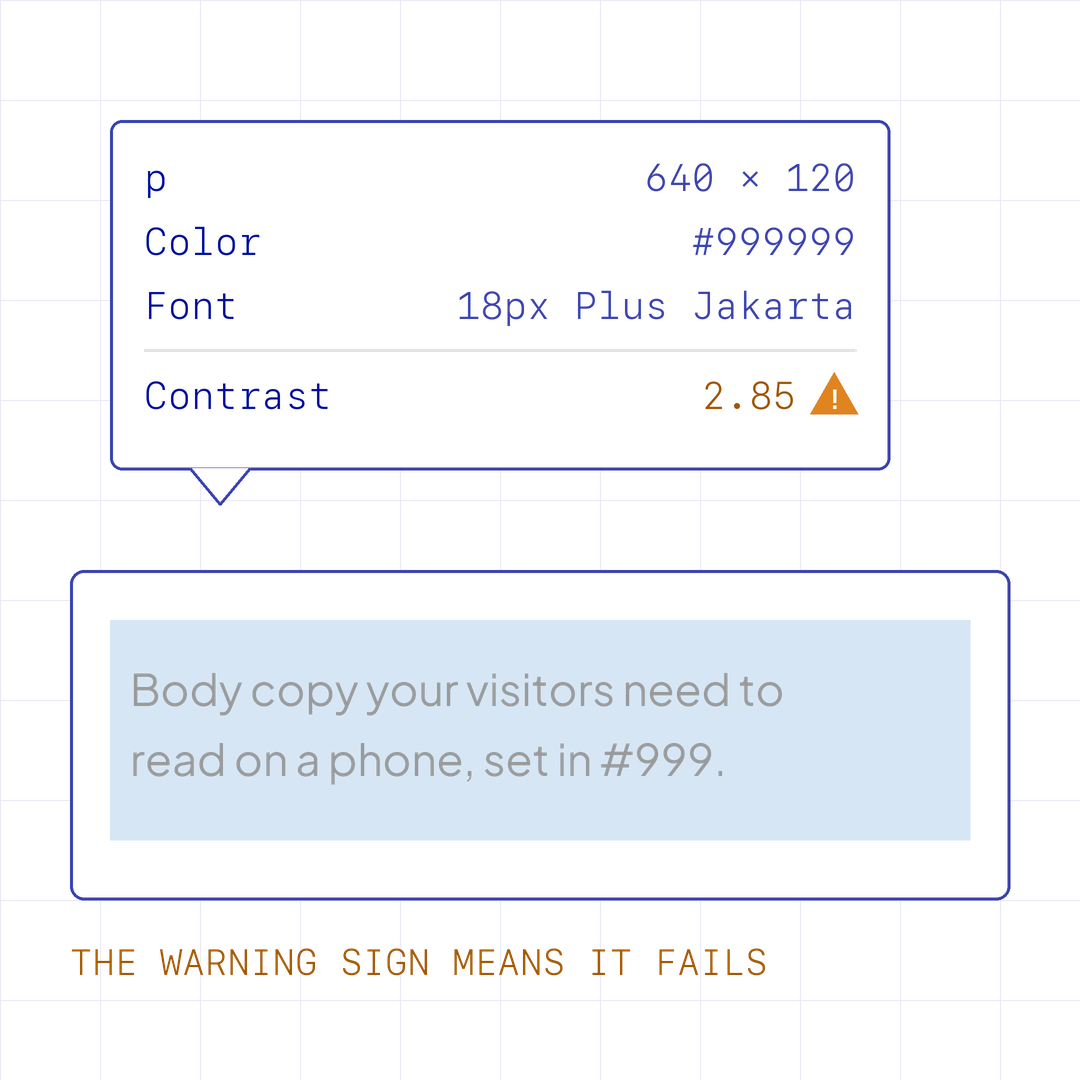
When a color fails, the Color Picker in DevTools suggests the nearest shade that passes, and it’s often closer to the original than you’d expect.
Pale text usually looks right on the screen it was reviewed on, which is why it gets through.
What I’d suggest: before the palette is signed off, read the body copy, captions and form hints on a phone in normal light. It takes a few minutes, and it’s much easier to change at that stage than after launch.
Send it over if you’re not sure how your site holds up. I’d like to hear what you’re working on, and the team at Dthree can take a look with you.
Not directly. Search engines don’t rank pages on contrast. It does affect whether people stay and read, and Lighthouse counts it in your accessibility score.
WCAG’s stricter AAA level asks for 7:1 for body text, about #595959 on white. It’s a good target for long reading such as articles and policies. For most marketing pages, 4.5:1 is the practical baseline.
Yes, and it’s harder because the background changes across the image. A dark overlay or a solid panel behind the text usually fixes it.
New writing on how the web actually gets built, plus the free pixel wallpaper pack when you subscribe.
Related reading
Based in Manila, working with teams across time zones.